01 / A clear daily record
Find the load behind the number.
Keep the date, customer, job site, suburb pair, tonnes, waiting time and charges together. Search a docket rather than reconstructing the job from separate notes.
DLD brings your loads, route rates, fuel and invoice checks into one company workspace—so the work you record can be followed through to the payment you receive.
No card required. Then $25 + GST per company, per month.
You still need to record the docket, check the paid kilometres and know which work has been invoiced. DLD keeps those steps connected.
Keep the date, customer, job site, suburb pair, tonnes, waiting time and charges together. Search a docket rather than reconstructing the job from separate notes.
Use distance-based tonne rates, customer minimums and private route exceptions. Save each load’s amounts so a later card change doesn’t silently rewrite your history.
Match Boral RCTIs to your loads, confirm kilometres, record payments and review outstanding activity. Export the records when it’s time to share them with your bookkeeper.
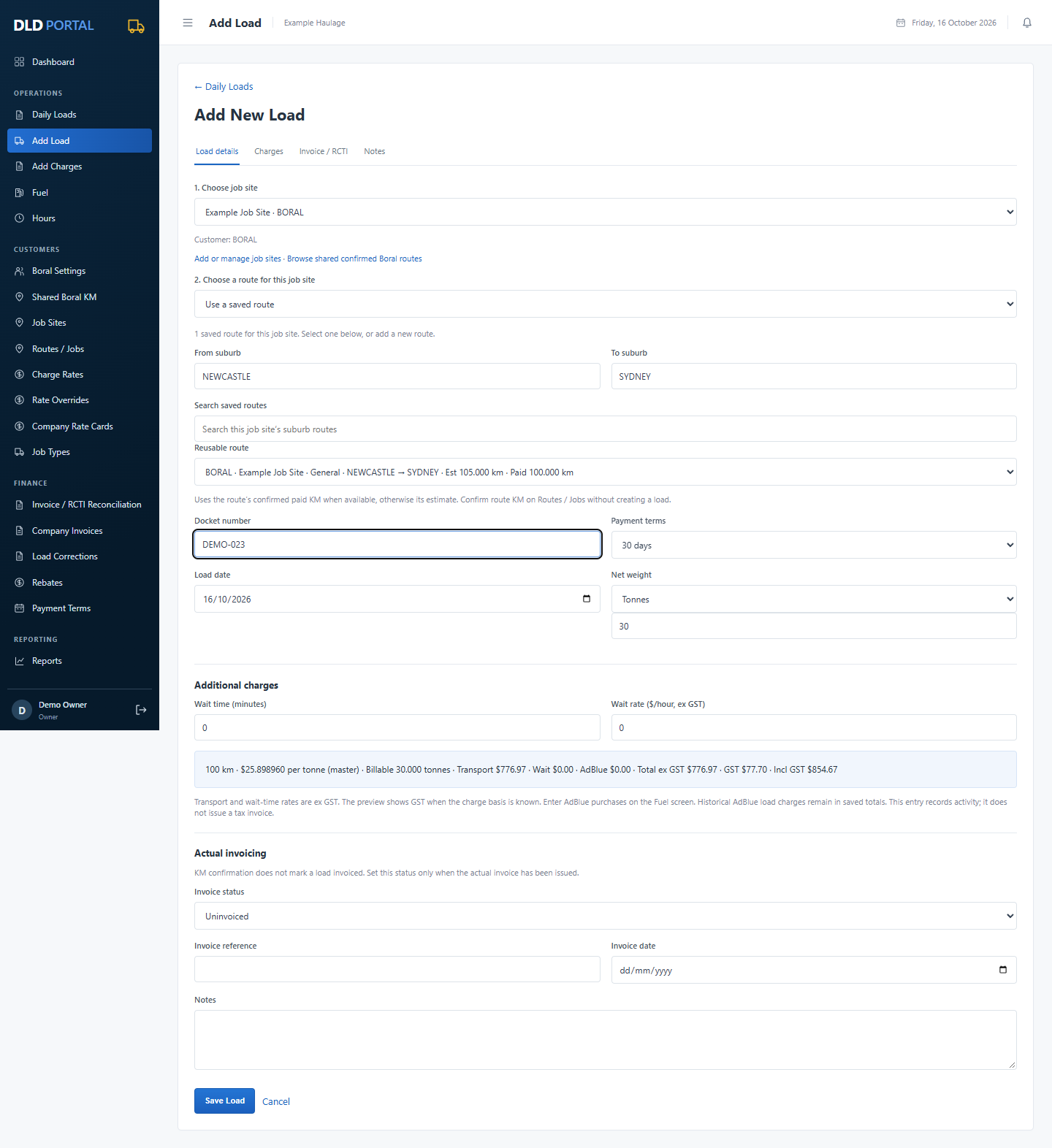
Choose the job site first. DLD shows its saved routes and fills in the customer. Choose a known route, narrow it by suburb, or add a new suburb pair for that same job site.
Actual DLD screen with fictional records. Open the image to see the full form.
Choose the job site first, then a saved route or add a new route. Enter the docket, date, tonnes and any waiting charges. Record AdBlue purchases in Fuel.
Enter confirmed kilometres for the individual load. Keep the original estimate visible for comparison.
Record the actual reference and date, then mark activity paid, open or disputed. Due dates follow the invoice date.
Use financial-year views, activity reports and CSV exports to review the business and prepare your records.
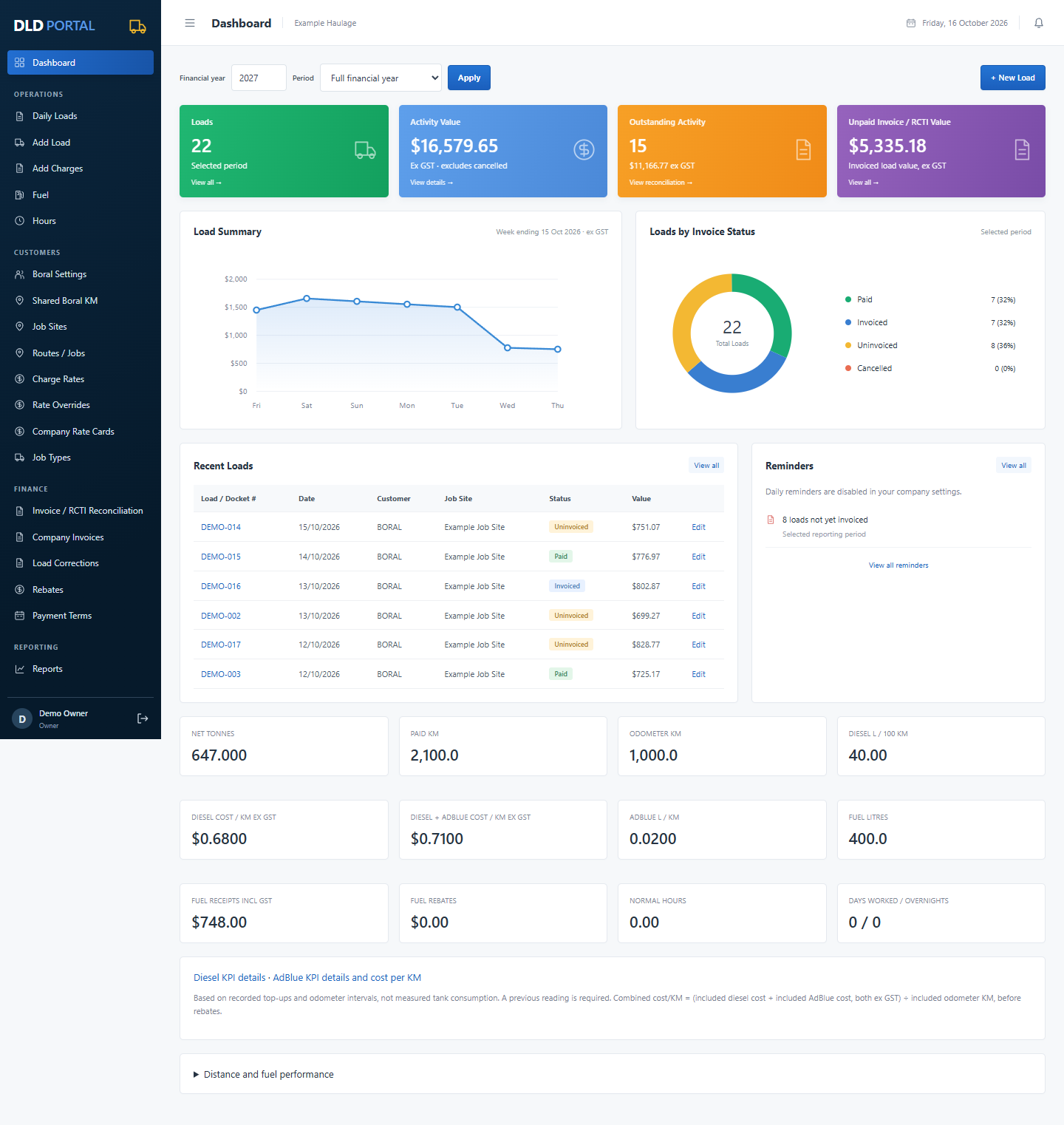
These are screenshots of the working portal, using a fictional Example Haulage company. No customer records are shown.
Start with Boral already configured. Keep your payment settings and operational records private; browse user-confirmed job-site kilometres shared by Boral contractors.
Record diesel and AdBlue separately, including litres, receipt costs and odometer readings. See litres/100km, individual cost/km ex GST and combined diesel + AdBlue cost/km on the dashboard.
Record working hours and time categories, including overnight entries. Maintain an operational history.
Track charge categories, minimums and entered rebate amounts alongside the work they relate to.
Submit questions, track replies and resolve tickets within your company. Support sees the conversation you send; access to operational records still requires separate Owner approval.
Accept a published card for your company. A late card leaves the previous accepted card in use provisionally; review potential backpay separately.
Delete a mistaken load that has no invoice or payment history, or preview corrections to selected uninvoiced loads. Confirmation and company audit entries make changes traceable.
Generate activity, unpaid-activity, fuel, diesel KPI and AdBlue KPI reports. Export CSV or use browser print/save-PDF.
Add a data-entry helper through an Owner-managed account. Both roles see company information; user changes and support approvals stay with Owners.
Other companies cannot see your operational records. Platform administrators need your company Owner’s approval to access them through the portal. The shared Boral rate card and user-confirmed site/suburb/state/kilometre reference library are the shared business references. Company identities, loads, costs, contacts, private rates and notes remain private.
Read how data access works →Try the workflow with your own company before you subscribe. No payment card is required during the trial.
Your Owner and data-entry helper use the same private workspace. If the trial ends without a subscription, your existing records remain available to view and export.
The trial is available now. Online subscription payments are being activated; the Subscription screen shows their current availability.
AUD $27.50 including 10% GST.
No card during the trial. Subscribe afterwards.
For the full step-by-step workflow, use the DLD user guide.
Australian owner operators and small haulage businesses that want to record loads and costs, check Boral RCTIs and keep a clear payment history. An Owner can add a data-entry helper without giving them control of users or support approvals.
No. You record and reconcile the invoice or RCTI Boral provides. DLD does not submit dockets, claims or invoices to Boral automatically.
No. Estimates guide new jobs. Known route kilometres can guide provisional pricing, but you confirm the actual paid kilometres separately for each load.
Your previous accepted card remains available provisionally. When your company accepts the new card, its effective date controls future pricing and you can review candidate backpay differences. Saved amounts stay intact; automatic retrospective backpay invoices are not enabled.
Yes. DLD uses responsive browser screens, including mobile navigation. You need an internet connection; offline entry is not currently provided.
A controlled migration can preserve source records and import the operational workflow. Contact DLD to arrange a migration; signup does not automatically upload or convert an Access database.
You can export reports as CSV. Company Owners can also download a private workspace backup. Viewing and exports remain available when a trial expires without a subscription.
DLD records haulage activity and supports invoicing and reconciliation. It does not currently provide bank feeds, automated bookkeeping, BAS lodgement or payroll processing.
Start a private company workspace and try the complete daily-load workflow for 14 days.